Managing tasks and remembering follow-ups shouldn’t require switching between multiple apps. Yet, many Microsoft Teams users still rely on sticky notes, Outlook reminders, or manual task lists to keep track of important conversations.
With the rise of artificial intelligence in Microsoft 365, a smarter way to stay organized has emerged. AI-powered reminder assistants can understand natural language, create reminders instantly, and notify you at the right time, all without leaving Microsoft Teams.
In this guide, we’ll explore how AI reminders work, how Microsoft Copilot is transforming workplace productivity, and how Abe, an AI reminder assistant for Microsoft Teams, helps teams never miss an important follow-up.
Why Traditional Reminders Are No Longer Enough
Modern workplaces move quickly.
A single Microsoft Teams chat can contain:
- Customer requests
- Project deadlines
- Meeting decisions
- Follow-up actions
- Approval requests
Unfortunately, these important messages often disappear beneath hundreds of newer conversations.
Traditional reminder methods require users to:
- Copy information into Microsoft To Do
- Create Outlook reminders
- Add Planner tasks
- Maintain personal notes
This process is time-consuming and often leads to forgotten tasks.
What Are AI Reminders?
AI reminders use artificial intelligence to understand user intent and create reminders automatically.
Instead of navigating multiple menus, users can simply communicate naturally.
Examples include:
- “Remind me tomorrow morning.”
- “Remind me to Follow up next Monday.”
- “Remind me before our weekly meeting.”
- “Remind me next Friday at 3 PM.”
AI understands both the reminder request and the timing, making the experience faster and more intuitive.
Microsoft Copilot Is Changing Workplace Productivity
Microsoft Copilot has introduced a new way of working within Microsoft 365.
By using AI to understand context, summarize conversations, and assist with daily tasks, Copilot helps employees become more productive.
However, while Copilot offers many intelligent capabilities, organizations often require specialized tools for specific workflows, including reminder management.
This is where dedicated AI assistants complement Microsoft Copilot by extending productivity inside Microsoft Teams.
Meet Abe: Your AI Reminder Assistant for Microsoft Teams
Abe is an AI-powered reminder assistant designed specifically for Microsoft Teams.
Instead of switching between multiple applications, users can create reminders directly from Teams conversations using natural language.
Whether you need a reminder later today, next week, or during business hours, Abe understands your request and schedules it automatically.
👉 Learn more about Abe for Microsoft Teams: https://marketplace.microsoft.com/en-us/product/dalikoo1587737518625.ai-assistant?tab=Overview
How AI Reminders Work with Abe
Creating reminders is simple.
Step 1: Select the Message
Choose the Teams message you want to remember.
Step 2: Ask Naturally
Examples include:
- Remind me tomorrow.
- Remind me during the week.
- Remind me Monday morning.
- Remind me to Follow up next Friday.
- Remind me after the client meeting.
Abe understands natural language without requiring complicated settings.
Step 3: Receive Your Reminder
At the scheduled time, Abe sends a reminder directly within Microsoft Teams, keeping the original conversation easily accessible.
Watch Demo : https://youtu.be/6j2p1bQ9N64?si=RP8-RUM1zZ-oGmCe
Why AI Reminders Are Better Than Manual Task Management
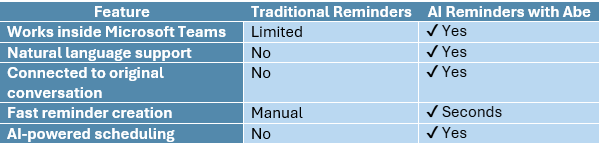
Stay Inside Microsoft Teams
No need to switch between Outlook, Microsoft To Do, Planner, or other applications.
Everything happens within Teams.
Understand Natural Language
Unlike traditional reminder systems that require selecting dates and times manually, AI understands phrases like:
- Tomorrow afternoon
- Next week
- Before Friday
- During business hours
This creates a much more natural user experience.
Maintain Conversation Context
One of the biggest challenges with manual reminders is losing the original message.
Abe keeps reminders connected to the original Teams conversation, making follow-ups easier and more accurate.
Save Time
Creating reminders takes only seconds.
Less administrative work means more time focused on meaningful tasks.
Reduce Missed Follow-Ups
Whether you’re managing sales opportunities, customer support, HR requests, or internal projects, AI reminders help ensure important actions are completed on time.
Ideal Use Cases for AI Reminders
Organizations across industries use AI reminders for many daily tasks.
Sales Teams
- Follow up with prospects
- Schedule proposal reminders
- Remember contract deadlines
Project Managers
- Track project milestones
- Follow up on action items
- Monitor deliverables
Human Resources
- Employee onboarding
- Performance review reminders
- Interview scheduling
Customer Support
- Customer callbacks
- Case follow-ups
- Escalation reminders
Executives
- Meeting preparation
- Approval requests
- Strategic follow-ups
AI Reminders vs Traditional Reminder Methods
Best Practices for Using AI Reminders
To maximize productivity:
- Create reminders immediately after receiving an important request.
- Use clear reminder descriptions.
- Schedule reminders before deadlines instead of at the last minute.
- Review recurring reminders regularly.
- Keep all reminder workflows inside Microsoft Teams whenever possible.
Why Organizations Are Adopting AI Reminder Assistants
As Microsoft 365 continues to evolve, organizations are looking for AI tools that solve practical business challenges.
Reminder management is one of the most common productivity pain points.
AI assistants like Abe help organizations:
- Reduce missed follow-ups
- Improve employee productivity
- Simplify daily workflows
- Increase accountability
- Minimize context switching
For businesses already using Microsoft Teams, adding an AI reminder assistant can significantly improve day-to-day efficiency.
Frequently Asked Questions
Can Microsoft Copilot create reminders?
Microsoft Copilot can assist with many productivity tasks, but organizations often use specialized reminder assistants like Abe to create and manage reminders directly within Microsoft Teams.
What is the best AI reminder app for Microsoft Teams?
The best solution depends on your workflow. If your organization needs reminders that work directly inside Microsoft Teams using natural language, Abe provides a dedicated AI-powered reminder experience.
Can AI understand natural language reminders?
Yes. AI-powered reminder assistants can understand requests such as “next Tuesday morning,” “after lunch,” or “during the week,” making reminder creation much faster than traditional methods.
Do AI reminders work for teams as well as individuals?
Yes. AI reminders can support personal productivity while also helping teams manage follow-ups, projects, customer requests, and recurring business tasks.
Final Thoughts
Artificial intelligence is changing the way people work inside Microsoft Teams.
Instead of manually creating tasks, copying information between applications, or relying on memory, employees can use AI-powered reminder assistants to stay organized and focused.
By combining the intelligence of Microsoft Copilot with dedicated reminder capabilities from Abe, organizations can simplify follow-ups, improve productivity, and ensure important work never gets overlooked.
If your team relies on Microsoft Teams every day, implementing an AI reminder assistant is a practical step toward a more efficient workplace.
Explore Abe for Microsoft Teams and see how AI reminders can transform your daily workflow: https://dalikoo.com/abe-ai-reminder/