
Employees rely on dozens of digital resources every day, including company policies, HR forms, project portals, training platforms, dashboards, customer systems, and shared documents.
The challenge is rarely a lack of resources. The real challenge is finding the right link when it is needed.
As organizations grow, important links often become scattered across Microsoft Teams channels, SharePoint pages, browser bookmarks, emails, spreadsheets, and chat messages. This creates confusion, wastes time, and makes it difficult for administrators to keep corporate resources current.
A centralized link management solution helps organizations organize, distribute, and maintain important corporate links across Microsoft Teams and SharePoint.
In this guide, we explain the challenges of managing corporate links, the benefits of centralization, and how Central Links can help employees access important resources more efficiently
Why Corporate Link Management Matters
Every department uses a different collection of tools and resources.
For example:
- Human Resources may share benefits portals, onboarding documents, and policy pages.
- Finance teams may use expense systems, payroll tools, and reporting dashboards.
- Sales teams may need CRM portals, pricing documents, and proposal templates.
- IT departments may share support portals, security resources, and software request forms.
- Operations teams may rely on project systems, vendor portals, and process documentation.
When these links are stored in different places, employees spend unnecessary time searching for them.
Poor link management can lead to:
- Lost productivity
- Outdated bookmarks
- Duplicate resources
- Broken links
- Inconsistent access to company information
- Repeated questions to IT and administrative teams
- Employees using unofficial or incorrect resources
A well-managed corporate link directory makes essential information easier to find and easier to maintain.
The Problem with Scattered Corporate Links
Many organizations manage links informally.
A manager may share a link in a Teams chat. An HR representative may place another link on a SharePoint page. Employees may save their own browser bookmarks or maintain personal spreadsheets.
Although this may work for a small team, it becomes difficult to manage as the organization grows.
Important links get buried in Teams conversations
Microsoft Teams is designed for fast-moving communication. A useful link shared today may become difficult to locate after several weeks of messages.
Employees may remember that a link was shared but not remember:
- Which team contained it
- Which channel it appeared in
- Who posted it
- When it was shared
Searching old conversations interrupts work and does not guarantee the correct resource will be found.
SharePoint links may be spread across multiple sites
Organizations often have many SharePoint sites for different departments, projects, or regions.
A useful link may exist on one site but remain invisible to employees who do not regularly visit that location.
Without centralized management, organizations may create multiple versions of the same link across different SharePoint pages.
Learn More: https://cntrl.ink/2/mylinks
Browser bookmarks are difficult to control
Personal browser bookmarks can be useful for individual employees, but they are not an effective corporate link management system.
Administrators cannot easily:
- Update everyone’s bookmarks
- Remove outdated links
- Confirm that employees are using official resources
- Organize bookmarks consistently
- Control access based on teams or departments
When a URL changes, employees may continue using an old bookmark until they encounter an error.
Spreadsheets require manual maintenance
Some organizations create spreadsheets containing important links. While this provides basic centralization, spreadsheets can quickly become outdated.
They also require employees to:
- Find the spreadsheet
- Open it
- Search through rows
- Confirm that they are using the latest version
A spreadsheet is useful for record keeping, but it may not provide the most convenient daily user experience.
What Is Centralized Corporate Link Management?
Centralized corporate link management means storing and maintaining important company links through one managed system.
Instead of employees searching through different tools, the organization provides a structured source for official resources.
A centralized solution should allow administrators to:
- Add and organize corporate links
- Update destinations when URLs change
- Remove outdated resources
- Group links by category or department
- Make links available inside employees’ existing workflows
- Maintain consistent naming and descriptions
- Reduce duplicate or unofficial resources
For employees, the experience should be simple. They should be able to find trusted company resources without searching across multiple systems.
Managing Corporate Links in Microsoft Teams
Microsoft Teams has become the main workplace application for many organizations.
Employees use it for:
- Chat
- Meetings
- Collaboration
- File sharing
- Project communication
- Accessing business applications
Because employees already spend much of their day in Teams, it is a practical location for corporate links.
Common ways organizations share links in Teams
Organizations often place links in:
- Channel posts
- Pinned messages
- Channel tabs
- Files
- Wikis or notes
- Team descriptions
- Individual chats
These approaches can work for specific teams, but they may not provide a consistent organization-wide system.
Limitations of storing links manually in Teams
Manually sharing links in Teams creates several challenges:
- Different teams organize links differently.
- Important posts move down the channel feed.
- Links may be duplicated across channels.
- There may be no clear owner responsible for updates.
- Employees may not know which link is official.
- New employees may struggle to locate older resources.
A dedicated corporate link directory inside Teams can provide a more structured experience.
Managing Corporate Links in SharePoint
SharePoint is widely used for company intranets, department portals, document management, and internal communication.
It is therefore another natural place to organize important links.
Common SharePoint link-management options
Organizations may use:
- Quick Links web parts
- Navigation menus
- SharePoint lists
- Department homepages
- Resource pages
- Intranet landing pages
These options can be effective, especially when an organization has a well-structured intranet.
However, managing links across many SharePoint sites can still become complex.
Common SharePoint challenges
Organizations may experience:
- Different navigation structures on different sites
- Duplicate resource pages
- Inconsistent link names
- Broken or outdated links
- Limited visibility across departments
- Difficulty deciding where a new resource belongs
When each department manages links independently, the employee experience may become inconsistent.
Why Microsoft Teams and SharePoint Should Work Together
Microsoft Teams and SharePoint are closely connected.
Every standard Microsoft Teams team includes a related SharePoint site for file storage and collaboration. However, employees may interact with these systems differently.
Some employees spend most of their time in Teams, while others depend on a SharePoint intranet.
A strong corporate link strategy should support both experiences.
The goal is not to force employees into one platform. The goal is to provide a consistent and reliable way to access resources regardless of where they work.
A centralized solution can help organizations:
- Maintain one source of truth
- Provide access in Microsoft Teams
- Support SharePoint-based workflows
- Reduce duplicate link collections
- Improve consistency across departments
Introducing Central Links
Central Links is designed to help organizations manage and access important corporate links within the Microsoft 365 environment.
It provides a centralized location for company resources, helping employees find the links they need without searching through chats, emails, spreadsheets, or multiple SharePoint pages.
Learn more about Central Links for Microsoft 365:
https://dalikoo.com/central-links/
With a centralized link solution, administrators can create a more organized experience while employees gain faster access to trusted corporate resources.
💡Add Abe and other Dalikoo productivity apps like Celebrations and New Hires right from the Microsoft Marketplace to boost your Microsoft Copilot and Teams experience.
Our tools improve collaboration, automate steps, and help teams work faster with less effort.
Benefits of Using Central Links
One source for important company resources
Central Links helps reduce the number of scattered link collections across the organization.
Instead of maintaining different lists in Teams, SharePoint, spreadsheets, and emails, organizations can provide a central resource directory.
Faster access for employees
Employees can spend less time searching for commonly used tools and documents.
This is especially helpful for resources such as:
- HR portals
- IT support pages
- Expense systems
- Training platforms
- Company policies
- Project systems
- Sales tools
- Customer portals
Easier link maintenance
When an important URL changes, administrators need a simple way to update it.
Centralized link management reduces the need to edit the same link in multiple locations.
More consistent employee experience
A standard corporate link system helps departments organize resources in a consistent way.
Employees do not need to learn a different structure for every team or SharePoint site.
Reduced dependency on browser bookmarks
Employees can access official resources through a managed company solution instead of relying only on personal bookmarks.
Better onboarding
New employees frequently need access to many internal systems during their first few weeks.
A centralized link directory can simplify onboarding by providing a clear starting point for essential resources.
Fewer repeated support questions
IT, HR, and operations teams often receive repeated questions such as:
- Where can I find the expense form?
- What is the link to the support portal?
- Where is the latest employee handbook?
- How do I access the training platform?
When resources are centralized, employees can find answers independently.
How to Organize Corporate Links Effectively
A centralized link system is most useful when the information is structured clearly.
Organize links by category
Common categories may include:
- Human Resources
- Finance
- IT Support
- Sales
- Marketing
- Operations
- Training
- Company Policies
- Employee Tools
Categories make large directories easier to navigate.
Use clear and consistent names
Avoid unclear labels such as:
- Portal
- Internal Tool
- Click Here
- System
Use descriptive names such as:
- Employee Benefits Portal
- IT Support Request Form
- Monthly Expense Submission
- Sales Proposal Library
Employees should understand the purpose of a link before opening it.
Add short descriptions
A brief description can help employees choose the correct resource.
For example:
IT Support Portal
Submit technical support requests and review existing tickets.
Assign ownership
Each major link or category should have an owner responsible for reviewing and updating it.
Potential owners include:
- IT
- Human Resources
- Marketing
- Finance
- Department administrators
Review links regularly
Organizations should schedule regular reviews to identify:
- Broken links
- Outdated systems
- Duplicate resources
- Incorrect descriptions
- Links that are no longer used
Quarterly or semiannual reviews may be appropriate depending on how frequently resources change.
Remove unnecessary links
A directory containing hundreds of rarely used links can become difficult to navigate.
Focus on resources that employees genuinely need and archive outdated items.
Central Links vs Manual Link Management
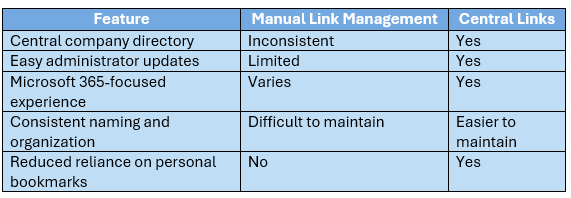
Manual methods may be sufficient for very small teams. However, organizations with multiple departments, locations, or Microsoft 365 workspaces can benefit from a more structured approach.
Corporate Link Management Use Cases
Human Resources
HR can organize links for:
- Employee benefits
- Leave requests
- Payroll
- Policies
- Training
- Performance reviews
- Onboarding documents
Information Technology
IT teams can provide access to:
- Helpdesk portals
- Password reset tools
- Security policies
- Software request forms
- System status pages
- Technical documentation
Sales and Marketing
Commercial teams can organize:
- CRM access
- Brand guidelines
- Presentation templates
- Campaign materials
- Proposal libraries
- Pricing documents
Finance
Finance departments can publish links to:
- Expense submission
- Procurement systems
- Invoice portals
- Budget templates
- Financial policies
Operations
Operations teams can manage:
- Project portals
- Vendor systems
- Scheduling tools
- Process documentation
- Compliance resources
How Centralized Links Improve Productivity
The time spent searching for a single link may seem minor. Across hundreds or thousands of employees, however, those small delays add up.
Consider an employee who spends five minutes each week searching for internal resources. Across a large workforce, this can result in significant lost time every year.
Centralized corporate links help reduce this friction.
Employees can move more quickly from finding a resource to completing the actual task.
This improves:
- Productivity
- Employee experience
- Process consistency
- Self-service access
- Digital workplace adoption
Supporting Remote and Hybrid Employees
Remote and hybrid employees depend heavily on digital resources.
They cannot always ask a nearby colleague where to find a form, tool, or portal.
A centralized directory provides consistent access regardless of location.
This is particularly important for organizations with:
- Multiple offices
- Distributed teams
- International employees
- Contractors
- Remote onboarding
- Different business units
Employees receive a common starting point even when they work in different regions or departments.
Security and Governance Considerations
Corporate link management is also part of information governance.
Organizations should ensure that:
- Only approved links are included
- Restricted systems are shared with the correct users
- Owners review resources regularly
- Links use secure destinations
- Outdated or unofficial resources are removed
- Naming standards are followed
A centralized system gives administrators greater oversight than unmanaged personal bookmarks or informal chat messages.
However, a link directory does not replace Microsoft 365 permissions. Employees must still have appropriate access to the linked resource.
Best Practices for Implementing Central Links
Start with the most frequently used resources
Do not wait until every corporate link has been documented.
Begin with the resources employees use most often.
Create a simple category structure
Avoid building too many categories at the beginning.
A clear, simple structure is easier for employees to understand.
Involve department owners
Ask each department to identify:
- Its most important resources
- The official destination for each link
- The person responsible for updates
Communicate the purpose
Explain to employees that the new directory is the approved place for company resources.
Include it in onboarding
Introduce Central Links during new employee onboarding so staff members begin using it immediately.
Review usage and feedback
Ask employees which links are difficult to find and whether additional categories are needed.
Frequently Asked Questions
What are corporate links?
Corporate links are URLs that provide employees access to internal or approved business resources, such as portals, forms, documents, applications, policies, and support systems.
What is the best way to manage links in Microsoft Teams?
The best approach is to provide a centralized, managed directory that employees can access from their regular Microsoft Teams environment instead of relying on scattered chat messages or personal bookmarks.
Can SharePoint be used to manage corporate links?
Yes. SharePoint includes navigation menus, Quick Links, lists, and web parts that can be used to organize resources. However, organizations may require a dedicated solution to maintain consistency across Teams and multiple SharePoint sites.
What is Central Links?
Central Links is a Microsoft 365-focused solution that helps organizations centralize and organize important corporate resources for easier employee access.
Are centralized links useful for remote employees?
Yes. A centralized directory gives remote and hybrid employees a consistent location for company resources regardless of where they work.
Does a centralized link directory control permissions?
No. The directory provides access to the link, but the destination resource should still use appropriate Microsoft 365 or application-level permissions.
Final Thoughts
Managing corporate links may appear to be a small administrative task, but it has a direct impact on employee productivity and the overall digital workplace experience.
When resources are scattered across Microsoft Teams conversations, SharePoint sites, emails, spreadsheets, and browser bookmarks, employees waste time and may access outdated information.
A centralized link management strategy creates a more reliable source of truth.
With Central Links, organizations can make important resources easier to find, easier to maintain, and more consistent across Microsoft Teams and SharePoint.
Explore Central Links and learn how it can help simplify access to corporate resources: https://marketplace.microsoft.com/en-us/product/web-apps/dalikoo1587737518625.centrallinks_subscription
💬 Try Abe, our smart Copilot Agent that helps you manage reminders, convert time zones, and quickly access important information right when you need it. Abe is built to simplify everyday tasks and keep you organized across Microsoft Copilot.