The way employees find information, collaborate, and interact with company resources continues to change. Organizations are managing growing volumes of documents, distributed teams, AI-powered tools, and increasingly complex digital workflows. Traditional intranets built primarily as static repositories are struggling to keep up.
In 2026, organizations need an intranet that does more than publish company announcements. Employees need a connected digital workplace where they can find information quickly, collaborate securely, automate everyday processes, and increasingly use AI to interact with organizational knowledge.
For organizations already invested in Microsoft 365, building an intranet on SharePoint provides a natural foundation for that experience. A modern Microsoft SharePoint intranet can combine content management, collaboration, enterprise search, automation, integrations, security, and artificial intelligence within the Microsoft ecosystem employees already use.
Here’s why more companies are considering SharePoint for their modern intranet strategy—and what organizations should consider before implementing one.
What Is a SharePoint Intranet?
A SharePoint intranet is an internal digital workplace built using Microsoft SharePoint and related Microsoft 365 technologies.
Instead of employees searching through emails, disconnected folders, multiple applications, or outdated internal websites, a SharePoint intranet can provide centralized access to important organizational resources.
Depending on the organization’s requirements, an intranet can include:
- Company news and announcements
- Policies and procedures
- Department portals
- Document libraries
- Employee resources
- Forms and business processes
- Search
- Knowledge bases
- Training materials
- Project information
- Personalized dashboards
- Automated workflows
- Business application integrations
- AI-powered knowledge experiences
The objective is not simply to create another website. A successful intranet should make it easier for employees to find information, complete everyday tasks, and collaborate across the organization.
Why Are Companies Reconsidering Their Intranets in 2026?
The workplace has changed considerably over the past several years. Hybrid work, cloud adoption, Microsoft Teams, automation, and generative AI have changed employee expectations. People increasingly expect workplace technology to provide the same characteristics they experience with modern consumer applications:
- Fast search
- Simple navigation
- Personalized information
- Easy access from anywhere
- Integrated tools
- Automated processes
- Intelligent assistance
Older intranets often struggle to provide this experience. Organizations may have thousands of documents and numerous business applications, but employees still ask:
“Where can I find this?”
“Which version is current?”
“Who owns this document?”
“Where do I submit this request?”
“Which site should I search?”
A strategically designed SharePoint intranet can help address these problems.
1. Microsoft 365 Is Already at the Center of Many Workplaces
One of the strongest reasons to consider an intranet on SharePoint is its relationship with the broader Microsoft 365 ecosystem. Organizations may already depend on:
- Microsoft Teams
- Outlook
- OneDrive
- Word
- Excel
- PowerPoint
- Microsoft Lists
- Power Automate
- Microsoft Copilot
SharePoint can serve as an information and content foundation connecting many of these experiences. Instead of introducing another disconnected platform, organizations can develop their intranet around technology already embedded in everyday work. This can help create a more unified digital workplace and reduce unnecessary information silos.
2. Employees Need a Single Destination for Trusted Information
Information fragmentation is a major productivity problem.Company knowledge may be distributed across:
- Email attachments
- Teams conversations
- Individual computers
- Shared drives
- Old intranet pages
- SharePoint sites
- Business applications
- Personal cloud storage
The problem becomes worse as organizations grow.
A well-structured Microsoft SharePoint intranet provides employees with an organized destination for approved organizational information.
For example, employees could access:
Human Resources
Benefits, policies, onboarding information, forms, and employee resources.
Finance
Expense procedures, procurement information, financial forms, and reporting resources.
IT
Support information, security guidance, software requests, and technical documentation.
Sales and Marketing
Templates, brand resources, sales materials, product information, and campaign assets.
Operations
Processes, procedures, project information, and business documentation. Creating a trusted source of information reduces the time employees spend trying to determine which document or resource is correct.
3. Modern SharePoint Intranets Improve Document Management
Document management remains one of SharePoint’s strongest capabilities.
Organizations can create structured document libraries with capabilities such as:
- Version history
- Access controls
- Metadata
- Search
- Content organization
- Collaboration
- Document approval processes
This is particularly important for organizations where multiple employees contribute to the same documents. Instead of emailing multiple versions of a file back and forth, teams can work with centrally managed content. A carefully planned information architecture also makes documents easier to discover.
4. AI Is Changing What Employees Expect from an Intranet
One of the biggest changes influencing intranet strategies in 2026 is artificial intelligence. Employees increasingly expect to interact with organizational information instead of manually browsing through pages and folders. Organizations can combine SharePoint with technologies such as Microsoft Copilot and other AI solutions to create more intelligent knowledge experiences. Depending on business requirements, AI can help organizations explore possibilities such as:
- Finding relevant organizational information
- Summarizing documents
- Analyzing content
- Supporting knowledge discovery
- Processing document information
- Creating conversational access to organizational knowledge
At Dalikoo, our SharePoint work can include artificial intelligence deployment through Microsoft Copilot, Azure OpenAI-based solutions, and intelligent document processing. We have also developed Azure OpenAI-based bots that run on SharePoint to help streamline content publishing and analysis. The result is an evolution from a traditional intranet toward a SharePoint AI Intranet—an environment where organizational knowledge can become more accessible and useful to employees.
5. SharePoint Can Automate Everyday Business Processes
An intranet should not only display information. It can also help employees complete work. SharePoint can be combined with Microsoft 365 automation capabilities to support workflows for processes such as:
- Document approvals
- Notifications
- Employee requests
- Content publishing
- Task management
- Data collection
- Internal forms
- Business approvals
For example, instead of downloading a form, completing it manually, emailing it to a manager, and waiting for confirmation, an organization may design a digital workflow that handles much of the process automatically. These improvements can turn an intranet from a passive information portal into an active business productivity platform.
6. SharePoint Intranets Can Connect with Existing Business Systems
Most organizations use multiple business applications.
These may include:
- CRM systems
- ERP platforms
- HR systems
- Financial applications
- Customer databases
- Reporting tools
When these systems operate independently, employees frequently need to move between applications to find information. A strategically designed SharePoint environment can integrate with existing systems to help reduce information silos and create a more connected digital experience. The specific integration approach depends on the organization’s systems, security requirements, and business processes. This is one reason experienced SharePoint consulting is valuable: the objective should not simply be deploying SharePoint, but determining how it fits into the organization’s broader technology environment.
7. Better Search Makes Organizational Knowledge Easier to Find
An intranet loses much of its value if employees cannot find what they need. Organizations frequently migrate large amounts of content into SharePoint without first considering:
- Information architecture
- Metadata
- Navigation Search
- Content ownership
- Document structure
The result may be a modern-looking intranet that still feels difficult to use. A successful implementation should consider information retrieval from the beginning. At Dalikoo, our SharePoint implementation methodology includes designing information architecture and customizing search to improve content discoverability. AI can further enhance the way employees interact with organizational information.
8. SharePoint Supports a More Personalized Employee Experience
Not every employee needs the same information. A salesperson, HR manager, finance employee, and IT administrator have different priorities. Modern SharePoint experiences can be designed around:
- Roles
- Departments
- Responsibilities
- Business requirements
Organizations can create intuitive navigation and personalized experiences that make relevant information easier to access. The objective is to reduce information overload while helping employees reach the tools and resources most important to their work.
9. Security and Governance Can Be Built into the Intranet Strategy
As organizations centralize more information, governance becomes increasingly important. A Microsoft SharePoint intranet should be designed with security and governance in mind. This can include:
- Access controls
- Content ownership
- Permission structures
- Version management
- Governance policies
- Data protection requirements
- Regulatory considerations
Dalikoo’s SharePoint consulting services include security and compliance planning to help organizations establish appropriate governance around their environments. Good governance also helps prevent an intranet from becoming cluttered with outdated, duplicated, or unmanaged information over time.
10. SharePoint Supports Remote and Hybrid Work
Employees may work from:
- Corporate offices
- Home
- Customer locations
- Different countries
- Mobile environments
A cloud-based intranet can provide employees with a consistent digital workplace regardless of physical location, subject to the organization’s access and security policies. This is especially useful for distributed organizations where employees cannot simply walk across the office to ask where information is stored. A well-designed intranet provides a common digital destination.
💡Add Abe and other Dalikoo productivity apps like Celebrations and New Hires right from the Microsoft Marketplace to boost your Microsoft Copilot and Teams experience.
Our tools improve collaboration, automate steps, and help teams work faster with less effort.
SharePoint Intranet vs Traditional Intranet
The difference between a traditional intranet and a modern SharePoint intranet is increasingly about what employees can accomplish through it.
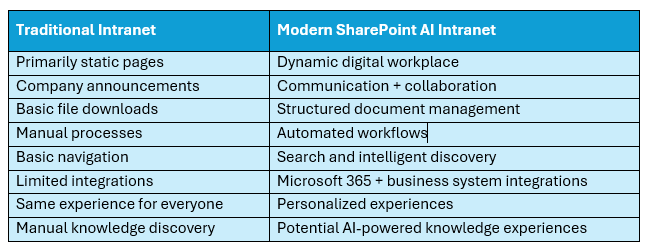
Organizations should therefore think beyond simply “redesigning the intranet.”
The larger opportunity is creating a connected employee experience.
The Biggest Mistake: Treating SharePoint Implementation as a Technology Project
Deploying SharePoint alone does not create a successful intranet. The technology is only one part of the project. Organizations also need to understand:
- What employees need
- How information should be organized
- What content should migrate
- Which workflows should be automated
- Which systems should integrate
- Who owns the content
- How users will be trained
- How the environment will be governed
Without this planning, organizations can simply move existing information problems into a newer platform. This is why the implementation methodology matters.
Dalikoo’s Approach to SharePoint AI Intranet Implementation
At Dalikoo, we use a structured methodology designed to align SharePoint with each organization’s business requirements. Our approach includes three major stages.
1. Discovery and Assessment
Successful SharePoint projects begin by understanding the organization rather than immediately configuring technology.
Our discovery process can include:
Stakeholder Workshops
We work with key stakeholders to understand business challenges, workflows, requirements, and desired outcomes. .
Content Audit
Existing content is reviewed to determine:
- What should migrate
- What should be reorganized
- What may be outdated
- How information should be structured
Migration Strategy
Organizations moving from legacy environments may require migration planning from platforms such as:
- On-premises SharePoint
- Google-based environments
- Lotus Notes
- Other collaboration platforms
Information Architecture
We design a clear information structure intended to improve navigation, search, information retrieval, and adoption.
2. Solution Design and Development
Once requirements are understood, the SharePoint environment can be designed around actual business needs.
Depending on the project, this may include:
Document Libraries
Configurable document libraries with access controls, versioning, and structured content management.
Automated Workflows
Workflows can streamline:
- Approvals
- Notifications
- Tasks Internal processes
Dynamic Lists and Forms
Organizations can capture and manage structured business information using customized lists and forms.
Search Customization
Search can be configured to make organizational information easier to discover.
Artificial Intelligence
AI capabilities can be incorporated through technologies such as:
- Microsoft Copilot
- Azure OpenAI
- Document AI and intelligent document processing
Business System Integration
SharePoint can be connected with systems such as CRM and ERP platforms to help reduce information silos.
User Experience
Navigation, dashboards, branding, and interface design are developed around employee usability and organizational requirements.
3. Deployment and Ongoing Support
Launching the intranet is not the end of the project.
Long-term adoption and maintenance are equally important.
Our approach includes:
Phased Implementation
Deploying in controlled phases can help reduce disruption and provide opportunities to refine the environment.
Employee Training
Training programs can be tailored to user roles and responsibilities.
Maintenance and Support
Ongoing support helps keep the SharePoint environment secure, optimized, and aligned with changing organizational requirements.
Why Work with Dalikoo for SharePoint Consulting?
Organizations considering a SharePoint intranet need more than technical configuration.
They need a partner capable of connecting technology decisions with business outcomes.
Dalikoo brings experience across SharePoint, Microsoft 365, artificial intelligence, automation, and custom development.
Our capabilities include:
Proven SharePoint Experience
We have helped organizations implement Microsoft technologies designed around their specific requirements.
Microsoft Partnership
Dalikoo is a Microsoft partner, and our work has been featured in Microsoft customer success stories.
AI Experience
We have developed Azure OpenAI-based solutions running on SharePoint to streamline content publishing and analysis.
Advanced Customization
Where standard SharePoint capabilities are not sufficient, we can develop:
- Custom web parts
- Workflows
- Integrations
- Branding
- Specialized functionality
Security and Compliance
We can help organizations establish security measures and governance policies appropriate to their SharePoint environment.
Is a SharePoint Intranet Right for Your Organization?
A SharePoint intranet may be worth considering if your employees regularly struggle with:
- Finding company information
- Locating the latest documents
- Navigating multiple internal systems
- Repetitive manual processes
- Information scattered across departments
- Poor enterprise search
- Outdated intranet technology
- Disconnected collaboration tools
- Knowledge accessibility
- Remote and hybrid collaboration
Organizations already using Microsoft 365 may have an additional advantage because SharePoint can work alongside many tools already present in their environment. However, every organization has different requirements. The right starting point is understanding the business problem before selecting the technology solution.
Frequently Asked Questions About SharePoint Intranets
What is an intranet on SharePoint?
An intranet on SharePoint is an internal digital workplace built using Microsoft SharePoint. It can centralize company information, documents, employee resources, communication, workflows, and other business content.
What is a Microsoft SharePoint intranet used for?
Organizations can use a Microsoft SharePoint intranet for document management, internal communications, employee resources, knowledge management, department portals, automated processes, search, and collaboration.
Can SharePoint be used as a company intranet?
Yes. SharePoint provides content management, document libraries, search, pages, lists, permissions, and Microsoft 365 integrations that can support modern company intranets.
Can AI be integrated into a SharePoint intranet?
Yes. Depending on the organization’s requirements and licensing, SharePoint solutions can incorporate technologies such as Microsoft Copilot, Azure OpenAI-based solutions, and intelligent document processing.
Why is SharePoint consulting important?
SharePoint consulting helps organizations address areas such as information architecture, migration, integrations, governance, user experience, automation, security, and adoption rather than treating the project as a basic software deployment.
How long does a SharePoint intranet implementation take?
Implementation timelines depend on factors such as organizational size, content volume, migration complexity, customization, integrations, governance requirements, and training needs. A discovery and assessment phase helps establish a realistic implementation plan.
Build a Strategic SharePoint AI Intranet
A modern intranet should do more than store documents. It should help employees collaborate, discover information, complete business processes, and make better use of organizational knowledge.
For companies already using Microsoft 365, SharePoint provides a powerful foundation for creating that experience. Combined with thoughtful information architecture, automation, integrations, governance, and AI, it can become a strategic digital workplace rather than simply another internal website.
Dalikoo provides SharePoint consulting and tailored SharePoint AI Intranet implementations through a structured approach covering discovery, solution design, deployment, training, and ongoing support. If your organization is considering a new SharePoint intranet or modernizing an existing environment, our team can help you determine the right approach.
Explore Dalikoo SharePoint Consulting:
https://dalikoo.com/consulting/
Explore Dalikoo’s SharePoint Intranet offering on Microsoft Marketplace:
💬 Try Abe, our smart Copilot Agent that helps you manage reminders, convert time zones, and quickly access important information right when you need it. Abe is built to simplify everyday tasks and keep you organized across Microsoft Copilot.