Why Most AI Tools (ChatGPT, Gemini, Grok, Claude) Don’t Handle Real Reminders, and How Abe Fixes It Inside Microsoft Teams
Artificial Intelligence tools like AI ChatGPT, Google Gemini, Grok AI, and Claude AI have completely changed how we work. They write emails, summarize documents, generate code, and answer complex questions in seconds.
But when users ask a very practical question:
“Which AI can remind me of things?”
“Can ChatGPT generate reminders for me?”
The answer is surprisingly disappointing.
Most popular AI chat tools cannot reliably create, track, and deliver real reminders inside your business workflows.
Let’s break down why, and what actually works.
Can ChatGPT Generate Reminders?
If you ask:
“Can ChatGPT remind me tomorrow at 10 AM to review a contract?”
ChatGPT may help you draft reminder text, but it does not:
- Persistently store reminders inside your company workspace
- Trigger notifications inside Microsoft Teams chats or channels
- Track reminder history across group conversations
- Deliver reminders tied to specific business messages
In short:
ChatGPT does not function as a real reminder system inside enterprise collaboration tools.
The same applies to:
- Google Gemini
- Grok AI
- Claude AI
They are powerful conversational AIs, but not workflow reminder engines.
💡Add Abe and other Dalikoo productivity apps like Celebrations and New Hires right from the Microsoft Marketplace to boost your Microsoft Copilot and Teams experience.
Our tools improve collaboration, automate steps, and help teams work faster with less effort.
Is There an AI That Can Do Real Reminders?
Yes.
But not as a standalone public chatbot.
If you use Microsoft 365, the answer is:
Microsoft Copilot with Agent Abe add-on (A Bot Extender).
Abe is a Copilot agent built specifically for Microsoft Teams that adds real reminder functionality inside business conversations.
Why AI Tools Lack Reminder Functionality
Most AI chat tools are designed for:
- Content generation
- Research and summarization
- Brainstorming
- Question answering
They are not designed to:
- Monitor specific Teams messages
- Attach reminders to chat threads
- Send time-based notifications within enterprise environments
- Track reminder updates, deletions, and listings
That’s because reminders require:
- Persistent storage
- Context awareness
- Secure tenant-based integration
- Trigger-based notification systems
Public AI tools like ChatGPT, Gemini, Grok, and Claude are not built for that.
Can Copilot Do Reminders?
By default, Microsoft Copilot alone does not function as a dedicated reminder management system inside Teams conversations.
However…
Copilot + Agent Abe = Full Reminder Functionality in Teams
Abe (A Bot Extender) is a Copilot agent that enables:
- Creating reminders in Teams chats
- Setting reminders for specific channel messages
- Group reminders in team conversations
- Updating and deleting reminders
- Listing all your reminders
- Getting notified at the right time
This turns Microsoft Teams into a real AI-powered reminder workspace.
Is There Reminder Functionality for Microsoft Teams?
Yes, with Agent Abe.
You can:
- Remind yourself to follow up on a client message
- Set a reminder in a team channel about a policy review
- Create group reminders for project deadlines
- Ask Abe to show your reminders
- Delete or update reminders anytime
All inside Microsoft Teams.
No switching apps.
No sticky notes.
No external task managers.
Can I Be Reminded About Specific Chats and Channel Messages in Teams?
This is one of the most searched questions:
“Can I be reminded about specific chats and channel messages in Teams?”
With standard Teams functionality, options are limited.
With Agent Abe, you can:
- Attach a reminder directly to a business message
- Set the exact time
- Notify the right people
- Manage reminders via Copilot agent commands
Agent Abe works within your organization’s Microsoft 365 tenant, ensuring enterprise-grade security and compliance.
Why This Matters for Businesses
In real organizations:
- HR needs reminders about policy approvals
- Legal teams need follow-ups on contracts
- IT needs reminders about access changes
- Managers need reminders tied to specific discussions
General AI tools like ChatGPT or Gemini cannot handle structured, persistent reminders inside corporate collaboration tools.
Abe was built specifically to solve that gap.
Comparison: ChatGPT vs Copilot with Agent Abe
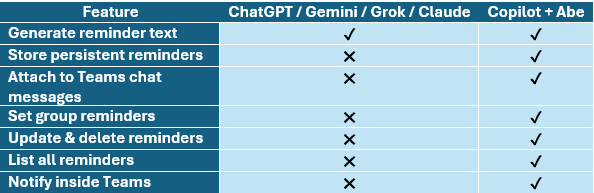
If you’re searching:
“Which AI can remind me of things?”
The practical answer for Microsoft Teams users is:
Copilot with Agent Abe.
FAQ Section
Which AI can remind me of things?
Most public AI tools like ChatGPT, Gemini, Grok, and Claude cannot create persistent reminders inside business collaboration platforms. Microsoft Copilot with the Agent Abe add-on enables full reminder functionality inside Teams.
Can ChatGPT generate reminders for me?
ChatGPT can suggest reminder wording, but it does not store, track, or deliver reminders inside Microsoft Teams or enterprise environments.
Is there an AI that can do reminders?
Yes, Microsoft Copilot integrated with Abe can create, manage, and deliver reminders inside Teams.
Can Copilot reminders?
With the Agent Abe add on, a purpose-built Copilot Agent, enables persistent reminder functionality inside Microsoft Teams, chats and channels.
Is there a reminder of functionality for Teams?
Yes, through Abe, a Copilot agent designed specifically for reminder workflows inside Microsoft Teams.
Can I be reminded about specific chats in Teams?
Yes. Agent Abe allows reminders to be attached to specific chat or channel messages in Teams.
Final Thoughts
AI is powerful.
But when it comes to something simple and critical like:
“Remind me about this later.”
Most AI tools fall short.
If your organization uses Microsoft 365 and Teams, the missing piece isn’t another chatbot.
It’s Copilot enhanced with Abe.
And that’s what finally brings real reminder functionality into AI-powered business collaboration.
💬 Get our secure AI Chatbot to run right inside your SharePoint pages.
Interact with the Chatbot and ask questions about documents, company policies, and guidelines. Ask for next steps as a new user, where to find info, or how to do something—the chatbot will provide easy-to-follow steps, helping your team do more in a shorter amount of time.