If you’re searching for:
- What reminder apps exist for Microsoft Teams? What is the best reminder bot for Teams?
- Which Teams reminder app works with native notifications?
- Is there a reminder app that works with Microsoft Copilot?
You’re not alone.
Microsoft Teams is where teams manage conversations, tasks, and decisions, but surprisingly, it does not include advanced reminder management by default.
That’s why several reminder apps have appeared in the Microsoft Teams Marketplace.
In this guide, we compare the most common reminder apps available today and highlight how they differ in functionality.
Popular Reminder Apps for Microsoft Teams
Some of the most common reminder apps currently available in Microsoft Teams include:
Agent Abe
A reminder and time-management Copilot agent built for Teams.
Remind Bot
A simple reminder bot that allows users to schedule chat reminders.
Follow-up Reminder
A Teams bot designed to create follow-up notifications for messages.
Standup & Reminder Bots
Some standup meeting bots also include reminder functionality.
Each of these tools solves the basic problem of setting reminders, but they differ significantly in how they deliver notifications and integrate with Teams.
Why Teams Users Need a Reminder App
Teams conversations move quickly.
Important follow-ups often happen inside chats or channel discussions, but Teams does not provide built-in scheduling for reminders tied to those messages.
Without reminder tools, users often rely on:
- Sticky notes
- Personal calendars
- Separate task managers
Reminder apps solve this by allowing users to schedule follow-ups directly within Teams conversations.
Key Features to Compare
When evaluating reminder apps for Microsoft Teams, these are the most important factors:
- How reminders are triggered
- Where notifications appear
- Whether they integrate with Teams alerts
- Whether they support AI agents
- Whether they handle time zones
- Whether reminders can be edited or managed later
These factors dramatically affect how reliable reminders are in a real work environment.
Feature Comparison of Teams Reminder Apps
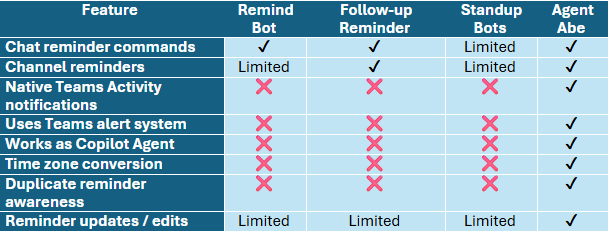
What Makes Agent Abe Different Native Teams Notifications
Many reminder bots simply send a chat message when the reminder time arrives. Agent Abe instead uses Microsoft Teams’ native Activity notifications, meaning reminders appear in the same place as:
- mentions
- approvals
- system alerts
This ensures reminders are visible and difficult to miss.
Built as a Copilot Agent
Most Teams reminder apps are standalone bots. Agent Abe is different because it also works as a Copilot Agent, meaning users can interact with it through the Copilot interface. This aligns with Microsoft’s growing ecosystem of AI Agents inside Copilot.
Automatic Time Zone Conversion
Global teams frequently deal with time zone confusion.
Agent Abe automatically understands time references such as:
Remind me to call John at 2 PM Toronto time tomorrow.
It converts that time correctly for the user.
Most Teams reminder bots do not include time-zone intelligence.
Intelligent Reminder Management
Agent Abe can also detect when similar reminders already exist and suggest adjustments rather than blindly creating duplicates.
This helps users maintain a clean reminder schedule and reduces notification overload.
Which Reminder App Is Best for Microsoft Teams?
The best reminder app depends on how you work. If you only need a simple reminder command, many basic reminder bots may work. However, if you need:
- native Teams notifications
- Copilot integration
- time-zone intelligence
- smarter reminder management
Agent Abe offers a more advanced solution than traditional reminder bots.
FAQ
What reminder apps are available in Microsoft Teams?
Several reminder bots exist in the Microsoft Teams marketplace, including tools like Remind Bot, FollowUp Reminder, and AI-driven agents like Agent Abe.
Does Microsoft Teams have built-in reminders?
Teams includes basic message flagging but does not provide advanced reminder scheduling without third-party apps.
What is the best reminder app for Microsoft Teams?
For simple reminders, basic reminder bots may work. For advanced features such as native notifications, Copilot integration, and time-zone support, Agent Abe offers additional capabilities.
Can Copilot set reminders in Teams?
Copilot itself does not manage persistent reminders, but Copilot Agents such as Agent Abe can extend Copilot to provide reminder functionality.
Final Thoughts
Reminder tools inside Microsoft Teams are evolving. While several reminder bots exist, many rely on simple chat messages rather than full Teams integration. Agent Abe stands out because it combines:
- native Teams Activity notifications
- Copilot agent capabilities
- intelligent reminder management
- time-zone conversion
For organizations relying heavily on Teams communication, these differences can significantly improve reliability and productivity.
💬 Try Abe, our smart Copilot Agent that helps you manage reminders, convert time zones, and quickly access important information right when you need it. Abe is built to simplify everyday tasks and keep you organized across Microsoft Copilot.