
One Platform, Fewer Licenses: Is It Time to Simplify with Microsoft 365?
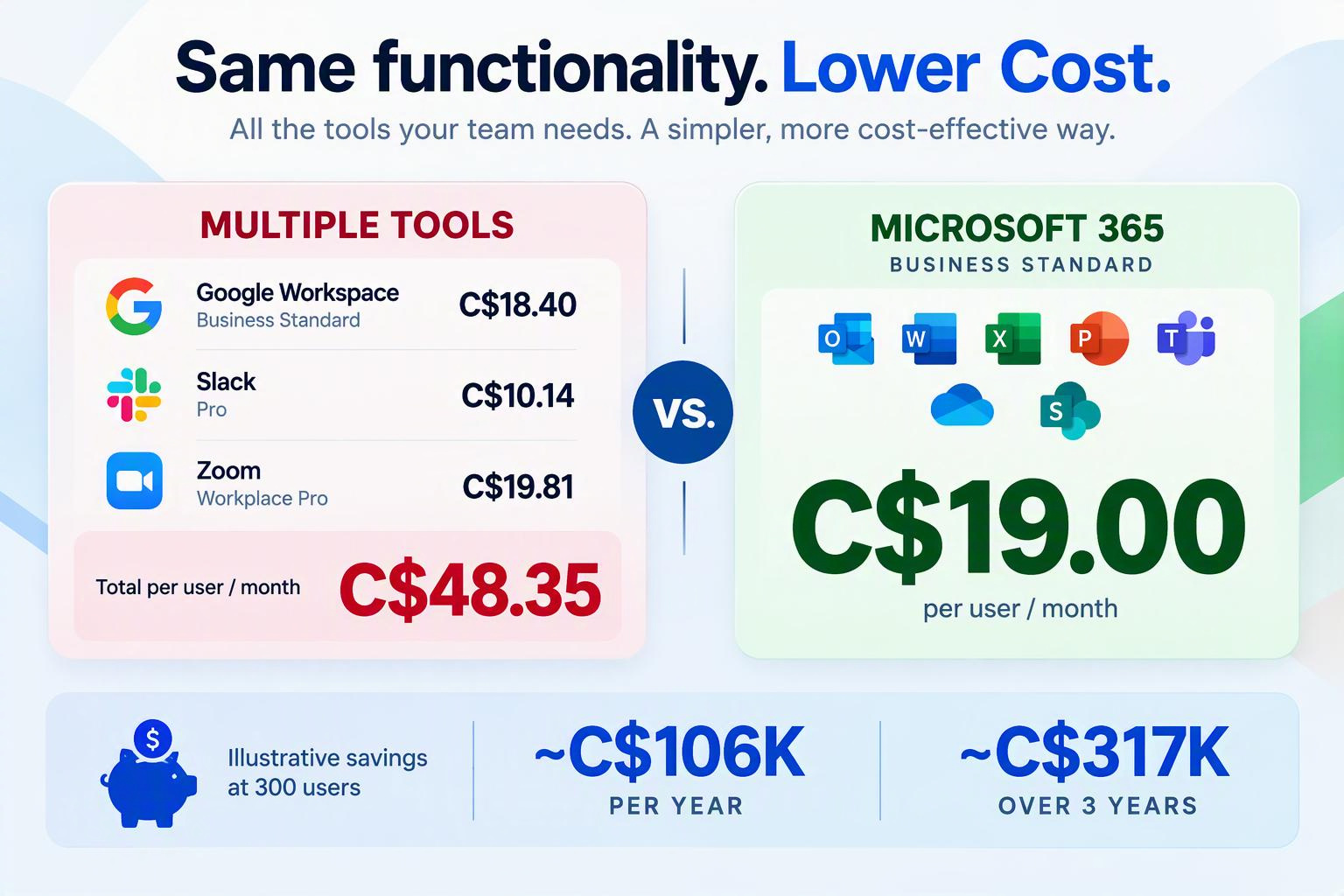
Google Workspace vs Microsoft 365. Many businesses build their collaboration environment one tool at a time.Google Workspace handles productivity. Slack supports team communication. Zoom provides meetings. Each tool may work well individually, but over time, separate subscriptions can create overlapping capabilities, additional administration, and unnecessary complexity.
That raises an important question:
Are separate collaboration tools making your business environment more expensive or complex than it needs to be?
Microsoft 365 may provide a simpler approach by bringing productivity, communication, meetings, storage, and collaboration into one integrated environment.
💬 Try Abe, our smart Copilot Agent that helps you manage reminders, convert time zones, and quickly access important information right when you need it. Abe is built to simplify everyday tasks and keep you organized across
Look at the Whole Stack, Not Just One App
Comparing Google Workspace with Microsoft 365 on its own does not always tell the whole story.
A business may also be paying separately for tools such as Slack and Zoom to provide capabilities that are available within Microsoft 365.
For example, our illustrative Canadian list-price comparison looks at a stack consisting of:
- Google Workspace Business Standard
- Slack Pro
- Zoom Workplace Pro
The combined illustrative cost is approximately C$48.35 per user/month.
Microsoft 365 Business Standard is shown at C$19.00 per user/month, representing approximately 61% lower licensing cost in this particular scenario.
The important point isn’t that every organization will save exactly the same amount. It’s that businesses should evaluate the total collaboration stack rather than comparing individual applications in isolation.
What Could Consolidation Look Like?
Microsoft 365 Business Standard combines several everyday business capabilities within one environment, including:
- Business email with Exchange and Outlook
- Desktop, web, and mobile versions of Word, Excel, and PowerPoint
- Microsoft Teams chat, calls, and online meetings
- 1 TB of OneDrive storage per user
- SharePoint content management and collaboration
For organizations already paying for multiple productivity and collaboration subscriptions, consolidation can therefore be worth evaluating.
The Impact Becomes More Significant at Scale
Small per-user differences can become much more significant as the number of employees increases.
In the scenario illustrated in our comparison, an organization with 300 users could see approximately:
~C$106K in illustrative savings per year
and
~C$318K over three years.
These figures are illustrative rather than a guaranteed savings calculation. The actual business case will depend on the subscriptions currently in use, negotiated or reseller pricing, taxes, migration requirements, implementation, and change-management costs.
Cost Isn’t the Only Consideration
License consolidation is only one part of the discussion.
There are several other reasons a Microsoft 365 environment may be a better business fit.
Native Office workflows
For teams that regularly work with complex Excel models, detailed Word documents, or customer-facing PowerPoint presentations, native Microsoft Office applications can be an important part of everyday workflows.
Fewer overlapping licenses
Microsoft 365 combines productivity, meetings, chat, storage, and collaboration capabilities within one environment, potentially reducing the need for overlapping subscriptions.
Simpler administration
Reducing the number of separate platforms can also mean fewer vendors, renewals, and management consoles for IT teams to manage.
workflows.
💡Add Central Links and other Dalikoo productivity apps like Celebrations and New Hires right from the Microsoft Marketplace to boost your Microsoft Copilot and Teams experience.
Our tools improve collaboration, automate steps, and help teams work faster with less effort.
Should Your Business Consider Moving to Microsoft 365?
There isn’t a one-size-fits-all answer.
If your business is already using Google Workspace alongside Slack, Zoom, or other collaboration platforms, however, it is worth looking at what you’re actually paying for across the entire environment.
The right comparison should consider:
- Your current subscriptions
- Number of users
- Features your employees actually use
- Existing Office workflows
- Administrative requirements
- Migration and implementation needs
- Potential licensing overlap
That gives you a much more realistic picture than comparing the price of two individual products.
Download the Microsoft 365 Cost Comparison
We’ve created a simple one-page customer brief showing an illustrative comparison between a fragmented Google Workspace, Slack, and Zoom environment and Microsoft 365 Business Standard.
Download the Google Workspace to Microsoft 365 comparison PDF
The guide includes the per-user comparison, an illustrative 300-user savings scenario, and some of the business considerations to evaluate before making a change.
teams to manage.
💬 Forgot to reply? Abe will remind you.
Abe’s reply tracking automatically brings Teams messages back to your attention when they still need a response.
Let’s Compare Your Actual Environment
The numbers in the guide are a useful starting point, but your current subscriptions and requirements are what really matter.
Dalikoo can help you review your existing collaboration stack, identify potential licensing overlap, and understand whether consolidating around Microsoft 365 makes business and financial sense for your organization.
Ready to take a closer look? Contact Dalikoo to compare your actual subscriptions, user requirements, and Office teams to manage.